
The four holes that matter more than screen size.
VESA patterns, weight limits and connector clearance: a compatibility check before you buy a TV mount.
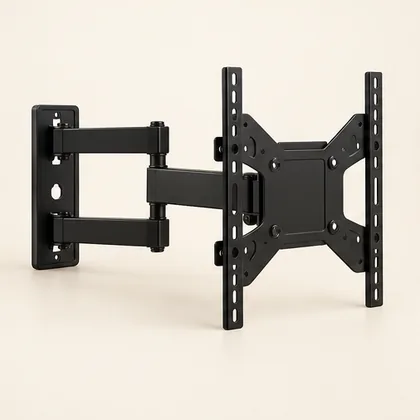 Setup concept. Not a photograph of a specific Mounters installation.
Diagonal size is only the beginning
A mount advertised for a broad screen-size range still needs to fit your television. Check weight without the stand, supported mounting pattern and manufacturer restrictions against the exact bracket’s documentation. A bigger number on the listing does not establish suitability for your wall or guarantee all required adapters are included.
Decode the mounting pattern
VESA patterns commonly describe horizontal by vertical spacing in millimeters between mounting holes. A 400 × 300 pattern describes spacing, not the television’s outer dimensions. Confirm it in the TV manual and compare with the bracket’s supported patterns. Four visible holes do not tell you the right screw diameter, length or engagement depth.
The back of the screen changes the plan
Recessed holes, a curved back and port placement can affect spacers, hardware and clearance. Incorrect screws can damage equipment. Follow the exact TV and bracket instructions, and check cable connections will not be trapped or sharply bent. If you already own a mount, find its label and photograph the available parts. An unidentified bracket is not verified merely because it held a previous television.
The useful takeaway: Check pattern, weight and clearance—not just diagonal size.
Bring this to your project conversation
Check pattern, weight and clearance—not just diagonal size.
Save both model numbers.
Photograph connections and bracket labels.
Keep original hardware and instructions together.
Check the details before you commit
This is a planning guide, not an installation specification. Product capabilities and room conditions vary. Use the current manual for your exact model and ask the appropriate qualified professional to assess structural, electrical or unusual site conditions. A photo can start a conversation; it cannot verify what is inside a wall.
VESA display standards overview
The pattern matches my old mount. What else should I check?
Confirm the exact bracket model, supported weight, TV restrictions and all required parts. Check access to ports and any manufacturer-specified spacers or adapters. Matching hole spacing alone does not verify screw engagement or wall attachment. An undocumented bracket should be treated as unidentified equipment, not assumed safe because it was previously in use.
Before agreeing to the work
- Confirm the weight without the stand.
- Identify supplied parts and model labels.
- Check port access after the screen is attached.
A question your room would ask.
Keep it about the topic. For a price or appointment, request a project quote.
Ask a question +
Keep planning.
Setup guide Fixed, tilt or full-motion: which TV mount fits your room?
Choose a mount around your viewing positions, wall and equipment—not just the diagonal size of your TV.
2 min read · Read guide → Setup guide
 Same TV. Different wall. Different plan.
Drywall, masonry and plaster are not interchangeable mounting surfaces. Here is what to share before an installer arrives.
2 min read · Read guide → Setup guide
 Moving day: save the screen. Keep the tiny parts.
Plan demounting, packing and reinstallation without assuming your next wall is the same as the last.
2 min read · Read guide →