
Fixed, tilt or full-motion: which TV mount fits your room?
Choose a mount around your viewing positions, wall and equipment—not just the diagonal size of your TV.
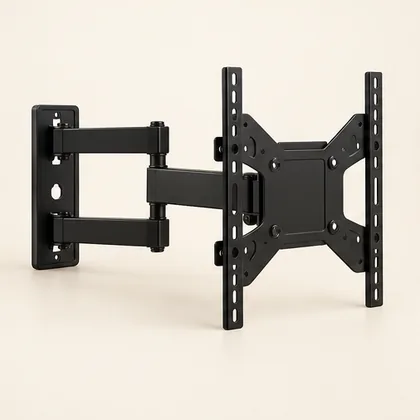 Setup concept. Not a photograph of a specific Mounters installation.
Choose a mount around your viewing positions, wall and equipment—not just the diagonal size of your TV.
Start with the way you watch
A TV facing one seating area has different needs from a screen shared between a sofa and a kitchen. Before choosing hardware, stand at each viewing position and consider whether the screen actually needs to move. A bracket that extends is useful only if its movement solves a real room problem.
One consistent position: consider a fixed mount.
Vertical angle adjustment: compare tilt options.
Several viewing positions: explore full motion.
Fixed mounts: simple placement, limited adjustment
A fixed mount holds the screen in a consistent position and is often designed for a close-to-wall finish. That can look tidy, but it also makes connector access important. Some plugs project farther than the mount allows. Check the TV’s port locations and the manufacturer’s required clearances rather than assuming a slim bracket fits every cable.
Tilt mounts: change the vertical angle
A tilt mechanism adjusts the screen vertically. It may help accommodate a particular seating arrangement, but it does not make an unsuitable mounting height comfortable by itself. The permitted angle, wall clearance and access for locking the bracket vary by product.
Full motion: useful flexibility, more to check
An articulating mount can extend and swivel, with tilt on many models. Extending a large screen changes the load on the mounting structure. Wall construction, fastener selection, bracket rating and the TV’s mounting pattern all need review. Plan enough cable slack for every permitted position without pinching or pulling connections.
What to have ready for a quote
Send the TV model number, an overview of the wall and your main seating positions. If you own a mount, include its model and all available hardware. A photo helps, but cannot establish the wall structure behind the surface.
TV model and approximate size.
Wall material and intended location.
Mount model, if already purchased.
Any rental permission or building restrictions.
References and next steps
Check the current instructions for your exact equipment. These guides help you prepare a project brief; installation suitability and scope require assessment.
SANUS: product specifications and installation resources
CPSC Anchor It: furniture and TV tip-over prevention
The sofa faces the TV, but the kitchen is off to one side. Do I need full motion?
Compare how often someone watches from the kitchen with the extra movement, cable access and wall requirements. A fixed position can still be the simpler choice if the main seats work well. If movement solves a real problem, share both viewing positions and ask for a compatible articulating option rather than choosing solely by extension distance.
Before agreeing to the work
- Does the proposed movement solve a viewing problem?
- Can cables move freely throughout the permitted travel?
- Can the locking and release mechanisms be reached later?
A question your room would ask.
Keep it about the topic. For a price or appointment, request a project quote.
Ask a question +
Keep planning.
Setup guide The four holes that matter more than screen size.
VESA patterns, weight limits and connector clearance: a compatibility check before you buy a TV mount.
2 min read · Read guide → Setup guide
 Same TV. Different wall. Different plan.
Drywall, masonry and plaster are not interchangeable mounting surfaces. Here is what to share before an installer arrives.
2 min read · Read guide → Interactive height tool
 Your neck called. Let’s lower the TV.
Use our interactive TV-height calculator to visualize a seated eye-level starting point before committing to a spot on the wall.
2 min read · Read guide →